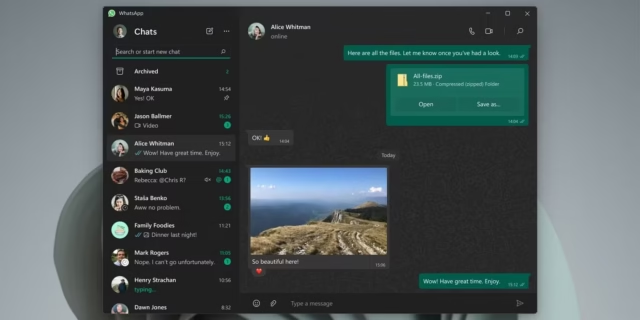
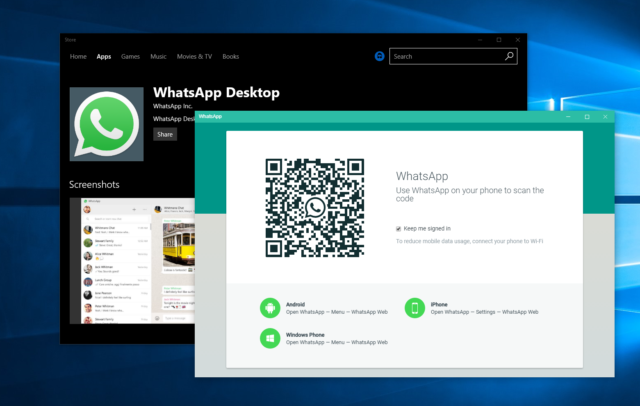

WhatsApp for Windows is the official desktop version of the world’s most widely used messaging app. It brings the full WhatsApp experience to your PC, letting you send messages, make calls, share files, and manage group chats directly from a larger screen with a full keyboard. If you spend most of your working day in front of a computer, switching between your phone and your monitor to check messages gets old fast. The Windows app solves that. You install it once, link it to your phone account by scanning a QR code, and your entire chat history syncs within seconds. There is no separate account to create, no extra subscription, and no cost involved. It works alongside your existing WhatsApp mobile account, and your phone does not need to stay online for the desktop app to function.
What Is WhatsApp for Windows?
WhatsApp for Windows is a standalone desktop application developed by Meta. It is available as a free download from the official WhatsApp website or through the Microsoft Store. The app is different from WhatsApp Web, which runs inside a browser. The Windows app installs directly on your machine and runs as its own program, which means you do not need to keep a browser open or manage browser tabs just to receive a message.
The app supports Windows 10 (64-bit, version 1903 or newer) and Windows 11. You link it to your existing mobile account using a QR code through the Linked Devices option in the WhatsApp mobile app. Once linked, you can use up to four devices simultaneously with the same account, and each device operates independently. Your conversations sync across all of them in real time.
As of late 2025, WhatsApp transitioned the Windows app from a native WinUI format to a Chromium-based WebView2 wrapper. This change affected performance on older hardware. On machines with 8 GB of RAM or less, users have reported higher CPU usage and slightly slower chat switching compared to the previous version. On modern hardware, the experience remains smooth. It is worth knowing this going in, especially if your PC is a few years old.
Core Features of WhatsApp for Windows
Messaging and Group Chats
The messaging experience on the Windows app mirrors what you get on mobile. You can send text messages, voice notes, photos, videos, documents, and GIFs. Group chats with up to 1,024 members are fully supported, and you can manage group settings, pin important messages, and search within a specific conversation. Typing on a full keyboard makes drafting longer messages considerably faster than on a phone. If you handle a lot of professional communication over WhatsApp, that alone makes the desktop app worth using.
Voice and Video Calls
WhatsApp for Windows supports both voice and video calls, including group calls with up to 32 participants. The call interface was updated in 2025 with clearer controls and a cleaner layout. You can use your PC’s built-in microphone and webcam, or connect external peripherals for better audio and video quality. Call quality depends on your internet connection, but on a stable broadband connection, voice calls are clear and video calls hold up well. The desktop call experience is better suited for longer conversations than holding a phone to your ear for 20 minutes.
File and Document Sharing
Sharing files on the Windows app is straightforward. You can drag and drop files directly into any chat window, which is faster than the mobile upload process. The app supports documents up to 2 GB per file, which covers most real-world use cases including PDFs, spreadsheets, presentation files, and compressed archives. If you regularly share project files or work documents with colleagues over WhatsApp, doing it from your desktop is much more practical than navigating your phone’s storage.
Privacy and Security Controls
WhatsApp uses end-to-end encryption on all messages and calls by default, including on the desktop app. In the Settings menu, you can control who sees your last seen time, who can view your profile picture, and who can see your status updates. You can also set a session lock password on the desktop app so that anyone who walks up to your computer cannot read your messages without entering your credentials. For people who share a workspace or a family PC, that setting matters.
Notification Management
The Windows app integrates with the Windows notification system, so message alerts appear in your taskbar and notification panel the same way other Windows app alerts do. You can customize notification settings per contact or group, muting specific chats for eight hours, one week, or permanently. If you work in an environment with a lot of WhatsApp group activity, turning off notifications for high-volume groups while keeping alerts active for direct messages keeps things manageable. There is also a Focus Mode compatibility setting that respects Windows focus sessions when you need uninterrupted work time.
Multi-Device Support and Independent Operation
One of the more practical changes WhatsApp made in recent years is multi-device support. Your Windows app no longer needs your phone to be connected or powered on to send and receive messages. You can leave your phone at home, open WhatsApp on your PC, and continue conversations without interruption. This works for up to four linked devices at the same time. Changes made on one device sync across all others, including read receipts and message deletions.
Real-World Experience
Using WhatsApp for Windows daily in a professional setting gives you a clearer picture of where it works well and where it falls short. Typing long responses, sharing files, and managing multiple group chats is genuinely easier on a desktop. For anyone who manages remote teams or client communication over WhatsApp, having the app open on your second monitor alongside your main workflow tools reduces the friction of constantly picking up your phone.
The Chromium-based update introduced in late 2025 is a real consideration. On a PC with a recent processor and 16 GB or more of RAM, the performance difference is barely noticeable. On an older machine with 4 to 8 GB of RAM and an aging CPU, you will likely notice slower animations and higher background CPU usage compared to the previous version. One practical fix is to disable the “Start WhatsApp at login” and “Minimize to system tray” options in Settings under General. That prevents the app from running in the background when you are not actively using it, which frees up system resources.
The export chat history feature added in 2025 is useful for documentation purposes. If you conduct project discussions over WhatsApp, you can now export those conversations as text files and keep them for your records. That is a practical addition for freelancers and small business owners who need a paper trail.
Conclusion
WhatsApp for Windows is a free, functional desktop app that makes everyday communication easier for anyone who works at a computer. It handles messaging, calls, and file sharing without requiring you to touch your phone every few minutes. The multi-device support works reliably, and the privacy controls give you enough options to manage your information sensibly. The main drawback is the performance impact of the Chromium-based engine on older hardware. If your machine is running low on RAM or has an aging processor, expect higher resource usage than before. On modern hardware, it runs fine. For professionals, remote workers, and anyone who uses WhatsApp as a primary communication tool, the Windows app is worth having installed.
WhatsApp for Windows System Requirements
| Component | Minimum Requirement | Recommended Requirement |
|---|---|---|
| Operating System | Windows 10 (64-bit, version 1903 or newer) | Windows 11 (64-bit, latest updates installed) |
| Processor (CPU) | Intel Pentium 4 or AMD Athlon 64 or equivalent | Intel Core i5 (8th Gen or newer) or AMD Ryzen 5 or higher |
| RAM | 4 GB | 16 GB or more |
| Storage | 200 MB free disk space for installation | SSD with 1 GB or more free space for media and cache |
| Graphics | DirectX 9 compatible graphics card | DirectX 11 or higher with updated drivers |
| Display Resolution | 1280 x 720 | 1920 x 1080 or higher |
| Internet | Stable broadband connection required for messaging and calls | High-speed broadband (25 Mbps or faster) for HD video calls and large file transfers |