
Video editing software can be frustrating. Either the program is too simple for real work, or it packs so many tools that new users give up within the first hour. CyberLink PowerDirector tries to sit between those two problems, and for the most part, it does it well. It has been around since 2001, and CyberLink has been updating it consistently ever since. The 2025 version is packed with AI-driven tools, supports up to 8K editing, and runs on both Windows and macOS. Whether you are editing a YouTube video, a short film, or a corporate presentation, PowerDirector gives you a full toolset without forcing you to spend months learning the software. This review covers what the software actually does, where it performs well, and what to keep in mind before you buy it.
What Is CyberLink PowerDirector?
CyberLink PowerDirector is a professional-grade video editing application developed by CyberLink Corp., a Taiwanese multimedia software company founded in 1996. The software targets content creators, YouTubers, small business owners, and semi-professional editors who need more than a basic trimmer but do not want the steep learning curve of Adobe Premiere Pro or DaVinci Resolve.
PowerDirector is available as a one-time purchase under names like Ultra, Ultimate, or as a subscription called PowerDirector 365. The subscription gives you continuous access to new AI tools and updates as they roll out, while the lifetime license locks you into the version you buy. The software runs on Windows 10 and 11 in 64-bit mode and, since the 365 version, on macOS as well. It also has mobile apps for Android and iOS, so you can rough-cut footage on your phone and finish it on your desktop.
Core Features of CyberLink PowerDirector
AI-Powered Background Removal
PowerDirector includes background removal directly in the editing timeline, and it works without a green screen. You drop your footage onto the timeline, open the AI tools panel, and the software analyzes the frame and separates your subject from the background. It handles most solid and semi-complex backgrounds accurately, which is genuinely useful for creators recording in non-studio environments. You can replace the background with any image, video clip, or solid color. For product reviewers or educators shooting at home, this feature alone saves a significant amount of setup time.
Motion Tracking
Motion tracking lets you attach text, graphics, or blur effects to a moving object across multiple frames. A common use case is blurring out a license plate in driving footage or adding a label that follows a product throughout a shot. You select the object in the first frame, tell PowerDirector to track it, and the software does the calculation automatically. The tracking accuracy is solid for standard handheld or mounted camera footage, though very fast or partially obscured objects can occasionally lose the track.
Multicam Editing
If you record events or interviews with multiple cameras, PowerDirector’s multicam editor lets you sync all the footage by audio waveform or timecode and then cut between angles in real time. You press play, and every time you click a camera angle in the viewer, it switches to that clip in the timeline. This is exactly how professional editors handle event footage, and having it available in a mid-range consumer tool is practical. You can support up to 6 simultaneous camera angles in the editor.
360-Degree Video Editing
PowerDirector handles equirectangular 360-degree footage natively. You import your 360 video, edit it with standard trim and color tools inside a special 360 viewer, add titles and effects, and export in a format ready for YouTube 360 or Facebook 360. For photographers and videographers using cameras like the Insta360 or GoPro MAX, this removes the need to use separate software just for 360 content.
Color Grading and LUT Support
The color grading tools inside PowerDirector include a color wheel, curves adjustment, histogram display, and support for LUT files. You can load a third-party LUT, adjust its intensity with an opacity slider, and then fine-tune the result with the wheels and curves. For editors who shoot flat or log profiles on mirrorless cameras, this is a necessary step before exporting. The color workspace is not as detailed as DaVinci Resolve’s dedicated color page, but it covers everything a standard commercial or content creation workflow requires.
Auto Subtitle Generation
PowerDirector generates subtitles from speech automatically. You select your audio or video clip, choose the language, and the software transcribes the dialogue and places timed subtitle blocks on a dedicated subtitle track. The accuracy is reasonable for clean audio with minimal background noise. You can edit each subtitle block individually, change the font and position, and export them as a burned-in file or as a separate SRT file for platforms that support external captions.
Real-World Editing Experience
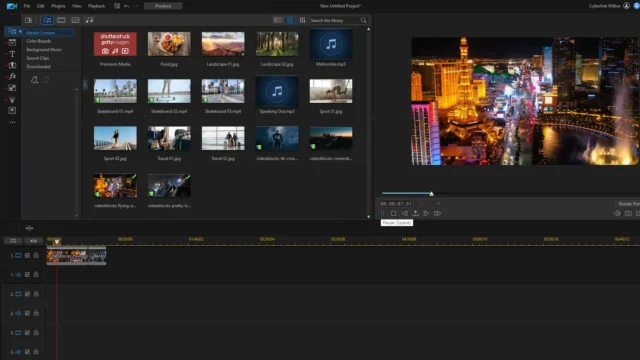
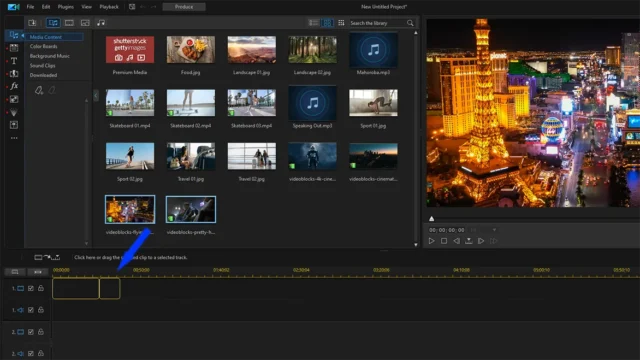
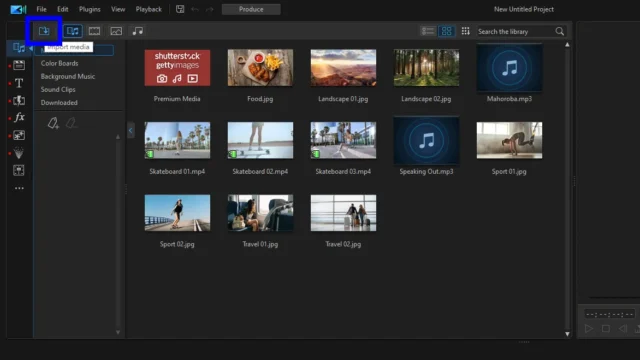
Opening PowerDirector for the first time, you get a clear mode selection screen. Full Feature Editor is the main workspace. The timeline layout is familiar: media bins on the top left, preview monitor on the top right, and a multi-track timeline at the bottom. Rendering performance is competitive. A 10-minute 4K timeline exported to H.265 at 4K resolution takes roughly 8 to 12 minutes on a mid-range system with an NVIDIA RTX 3060, which is faster than most similarly priced tools.
Pricing and Versions
CyberLink offers PowerDirector in three main packages. PowerDirector Ultra is the entry-level lifetime license. PowerDirector Ultimate adds more effects packs and content creator tools. PowerDirector 365 is the subscription tier at approximately $69.99 per year, and it includes all updates and AI tool additions as they release. The Director Suite 365 bundle extends to include AudioDirector, PhotoDirector, and ColorDirector for around $119.99 per year.
Conclusion
CyberLink PowerDirector is a capable, well-maintained video editing tool that delivers real production value at a mid-market price. The AI tools are genuinely useful, the timeline is responsive, and the export options are comprehensive. Its background removal, auto subtitle generation, and multicam editing make it a practical choice for modern content workflows. The main limitations are the GPU dependency for smooth performance on complex projects and the visual output ceiling compared to fully render-based solutions. If your work fits the mid-range production bracket, PowerDirector is one of the better options available in 2025.
CyberLink PowerDirector System Requirements
| Component | Minimum Requirement | Recommended Requirement |
|---|---|---|
| Operating System | Windows 10 (64-bit) | Windows 11 (64-bit) or macOS 11 Big Sur and above |
| Processor (CPU) | Intel Core i-series (6th generation) or AMD Phenom II and above | Intel Core i7 (8th generation or above) or AMD Ryzen 7 and above |
| RAM | 4 GB | 16 GB or more |
| Storage | 10 GB free disk space | SSD with 20 GB or more free space |
| Graphics | 128 MB VGA VRAM with DirectX 11 support | NVIDIA RTX 2060 or higher with 4 GB VRAM for AI features |
| Display Resolution | 1024 x 768, 16-bit color or higher | 1920 x 1080 or higher |
| Internet | Required for license activation | Required for cloud services, AI updates, and online content access |