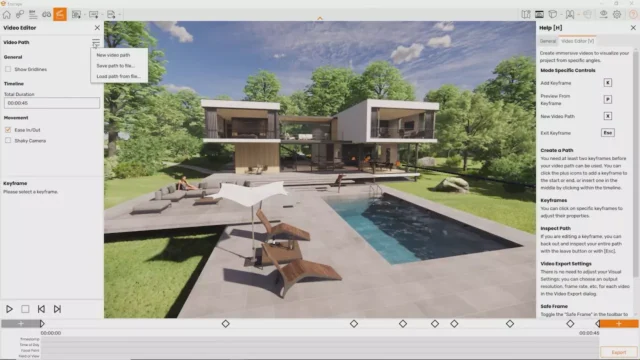

Chaos Enscape is a real-time rendering and virtual reality plugin that works directly inside your existing design software. It does not ask you to export your model, open a separate application, or rebuild materials from scratch. You stay inside your modeling environment and get a live rendering window that updates as you work. For architects, interior designers, and visualization professionals, that workflow change is significant.
What Is Chaos Enscape?
Enscape started as an independent rendering tool and was acquired by Chaos, the company behind V-Ray, in 2022. Today it sits within the Chaos product family alongside V-Ray, Phoenix, and Chaos Cloud. The acquisition brought tighter integration options for firms that use multiple Chaos products, though Enscape continues to function as a standalone plugin with its own pricing and installer.
The plugin integrates with Revit, SketchUp, Rhino, ArchiCAD, and Vectorworks. You install it, open your model, and launch Enscape from a toolbar. A real-time rendering window opens immediately, showing your model with lighting, materials, reflections, and shadows already applied. Every change you make in your host software updates the rendering window within seconds.
This approach works well for design teams that need to communicate spatial ideas quickly. Instead of producing a static image after the design is finalized, you can walk a client through a space during the design process, adjust materials on the spot, and see the result immediately.
Core Features of Chaos Enscape
Real-Time Rendering
The core of Enscape is its real-time rendering engine. When you open Enscape alongside your model, you get a rendered view that responds to edits without a render queue or wait time. You move a wall in Revit, it moves in Enscape. You change a material in SketchUp, the rendering window updates in a few seconds.
The rendering quality is not at the level of a fully baked V-Ray or Corona render, but it is good enough for client presentations, design reviews, and walkthrough videos. For most schematic and design development phases, Enscape produces visuals that communicate the design clearly without requiring a dedicated rendering workstation.
Virtual Reality Output
Enscape supports VR output through headsets compatible with SteamVR, including the Meta Quest series when used with a link cable or Air Link, as well as Valve Index and HTC Vive devices. You press the VR button inside Enscape and your client can walk through the model at full scale.
This feature works best during client meetings where you want to give someone a spatial sense of a space before construction. An interior designer showing a kitchen renovation can place the client inside the model and let them check ceiling heights, counter placements, and window views at a 1:1 scale. That kind of feedback session tends to resolve design questions faster than reviewing 2D drawings.
Asset Library
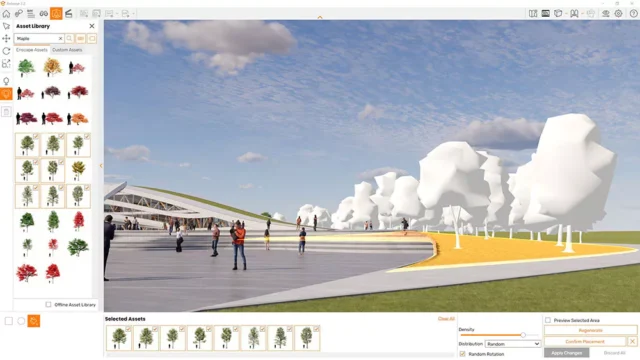
Enscape includes a built-in asset library with over 3,000 models covering furniture, plants, vehicles, people, and lighting fixtures. These assets come pre-configured with materials and behavior settings that work correctly inside the Enscape rendering environment. You drag them into your model from within the Enscape interface, and they appear in the live render immediately.
The library is useful for populating scenes quickly. Adding context, like placing people at a building entrance or furniture in an office, helps clients read a space correctly. Without those elements, rendered architectural spaces can feel abstract and hard to evaluate at scale.
Standalone Executables and Panoramas
Enscape lets you export your rendered model as a standalone executable file. That file runs on any Windows PC without requiring Enscape or your host modeling software. You send it to a client or contractor, they open it, and they can navigate the model freely using standard keyboard and mouse controls.
For clients who cannot attend a live presentation, this is a practical option. They receive a single file, open it on their computer, and walk through the space at their own pace. Enscape also exports 360-degree panoramas that you can upload to the Enscape cloud platform and share via a browser link, with no file download required on the client’s end.
Atmosphere and Lighting Controls
Enscape gives you control over sun position, time of day, cloud coverage, and artificial light sources. You can set a specific date and time to match your building’s geographic location, which gives you accurate shadow studies for any time of year. Moving the sun position slider in real time shows you how shadows move across a facade or interior floor throughout the day.
Interior lighting in Enscape reads from the IES profiles and color temperatures assigned to your light fixtures in the host software. If you have placed a 3000K pendant light in Revit, Enscape renders it with the correct warm tone and falloff. This keeps your rendered scenes consistent with the actual lighting specification in your project.
Conclution
Enscape runs on Windows only. There is no macOS version, which is a hard stop for designers working on Apple hardware. If your studio runs Mac workstations, Enscape is not an option without a Windows machine or Boot Camp setup.
Performance depends heavily on your GPU. On hardware with less than 8 GB of VRAM, complex scenes with dense geometry and many light sources can cause the frame rate to drop or the rendering window to become unresponsive. Keeping scene complexity manageable and using Enscape’s level-of-detail settings helps, but the GPU dependency is real.
The rendering output, while fast and usable, has a visual signature that experienced eyes recognize. Very large practice firms with dedicated visualization teams will likely continue using V-Ray or other CPU-based renderers for final client deliverables. Enscape fills the gap between rough design models and polished final renders, not the role of the final render itself.
Chaos Enscape System Requirements
| Component | Minimum Requirement | Recommended Requirement |
|---|---|---|
| Operating System | Windows 10 (64-bit) | Windows 11 (64-bit) |
| Processor (CPU) | 2 GHz multi-core processor | 3+ GHz multi-core processor (Intel Core i7 or AMD Ryzen 7) |
| RAM | 8 GB | 32 GB or more |
| Storage | 10 GB free disk space | SSD with 20+ GB free space |
| Graphics | NVIDIA GTX 1060 or AMD RX 580 with 6 GB VRAM | NVIDIA RTX 3080 or AMD RX 6800 XT with 10+ GB VRAM |
| Display Resolution | 1920 x 1080 | 2560 x 1440 or higher |
| Internet | Required for license activation | Required for cloud sharing, panorama uploads, and updates |