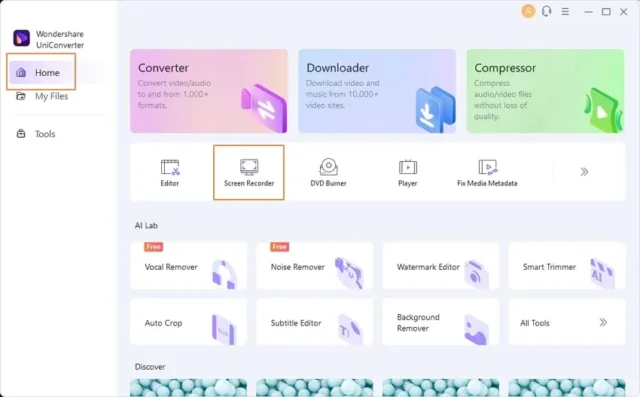


Handling video files can quickly become complicated. You may need to convert formats, compress large videos, download online content, or prepare files for different devices. Instead of using multiple tools, many users prefer an all-in-one solution. This is where Wondershare UniConverter stands out.
Developed by Wondershare, UniConverter is designed to simplify video processing tasks while maintaining quality and speed. It is widely used by content creators, students, and professionals who want fast and reliable results without a complex workflow.
What Is Wondershare UniConverter?
Wondershare UniConverter is a complete video conversion and media management software. It allows you to convert videos into different formats, compress files, edit content, and download videos from online platforms.
Unlike basic converters, UniConverter combines multiple tools into one interface. This reduces the need to install separate software for editing, converting, and downloading.
Key Features of Wondershare UniConverter
UniConverter offers a wide range of features that cover almost every video-related task.
High-Speed Video Conversion
One of the main strengths of UniConverter is its fast conversion speed. The software uses advanced acceleration technology to convert videos quickly without reducing quality.
You can convert files into formats like MP4, AVI, MOV, MKV, and more. This is useful when preparing videos for different devices or platforms.For example, if you record a video in a high-resolution format, you can convert it into a smaller format for sharing online without noticeable quality loss.
Video Compression Without Quality Loss
Large video files can be difficult to share or store. UniConverter allows you to compress videos while maintaining good quality.You can adjust resolution, bitrate, and file size according to your needs. This is helpful when uploading videos to social media or sending files through email.For users with limited storage or slower internet, this feature makes a big difference.
Built-in Video Editor
UniConverter includes a simple video editor that allows you to trim, cut, merge, and apply basic effects.You can add subtitles, watermarks, and adjust brightness or contrast. While it is not as advanced as professional editing software, it is enough for quick edits and adjustments.This saves time because you don’t need to switch between different applications.
Video Downloader and Recorder
Another useful feature is the ability to download videos from online platforms. UniConverter can detect video links and download them directly to your system.It also includes a screen recorder, allowing you to record videos, tutorials, or live streams.This is especially useful for content creators who need to capture and reuse online content for educational or personal use.
DVD Burning and File Transfer
UniConverter supports DVD burning, allowing you to create discs from your video files. You can also transfer files directly to devices such as smartphones.This feature is useful for users who still use physical media or need offline backups.
AI Tools and Smart Features
Recent versions of UniConverter include AI-based tools that improve efficiency. These tools can help with automatic cropping, noise reduction, and background removal.AI features reduce manual work and make the software easier to use, especially for beginners.
Who Should Use Wondershare UniConverter?
Wondershare UniConverter is suitable for a wide range of users.
Content creators can use it to convert and compress videos. Students can prepare presentations and projects. Professionals can manage media files efficiently. General users can handle everyday video tasks without technical knowledge.It is especially useful for users who want an all-in-one solution instead of multiple tools.
UniConverter vs Other Video Tools
Compared to other video tools, UniConverter focuses on simplicity and speed. While professional editors offer deeper editing features, UniConverter provides a faster and easier workflow for everyday tasks.It is ideal for users who prioritize convenience and efficiency.
Wondershare UniConverter System Requirements
| Component | Minimum Requirement | Recommended Requirement |
|---|---|---|
| Operating System | Windows 10 / macOS 11 | Windows 11 / macOS 13 or later |
| Processor (CPU) | Intel i3 or equivalent | Intel i5 / AMD Ryzen 5 or better |
| RAM | 2 GB | 4–8 GB |
| Storage | 1 GB free space | SSD with 10+ GB free space |
| Graphics | Basic GPU support | Dedicated GPU recommended |
| Internet | Required for downloads | Required for updates & online features |