
Adobe Photoshop Elements has been around long enough to prove it is not just a stripped-down version of full Photoshop. It is a dedicated photo editing application built for photographers and home users who want real editing power without a steep learning curve or a monthly subscription. You pay once, you own the software, and you get tools that cover everything from basic corrections to layered compositing and guided creative effects. If you shoot photos regularly and want more control over how your images look without spending years learning professional software, Photoshop Elements gives you a practical path to get there. The 2024 version added AI-powered tools that speed up common editing tasks, making it more capable than many people expect from a consumer-level application. This article covers what the software is, what it does well, what it does not, and whether it fits your actual workflow.
What Is Adobe Photoshop Elements?
Adobe Photoshop Elements is a photo editing and organizing application designed for enthusiast photographers, hobbyists, and small creative teams that do not need the full professional toolset of Adobe Photoshop CC. Adobe released the first version in 2001, and the software has been updated annually since then. Unlike Photoshop CC, which requires an active Creative Cloud subscription, Photoshop Elements is sold as a one-time purchase. You buy version 2024, install it, and use it indefinitely without worrying about a monthly charge cutting off your access.
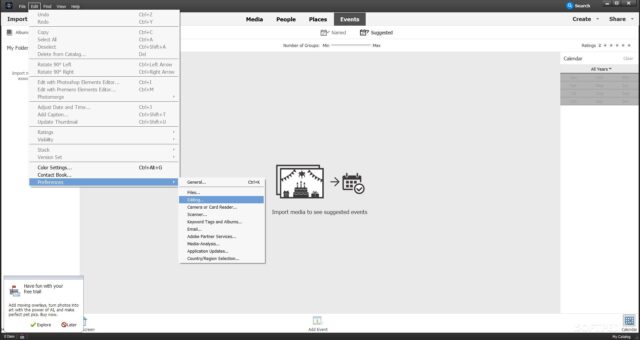
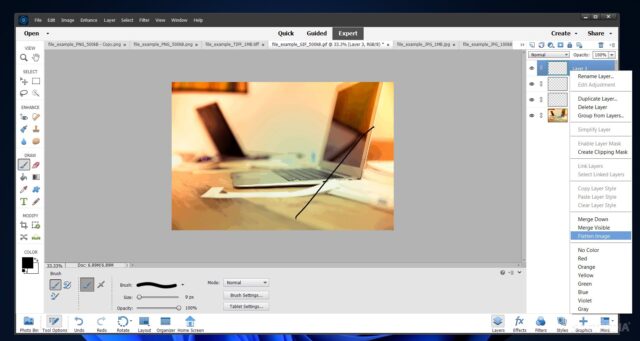
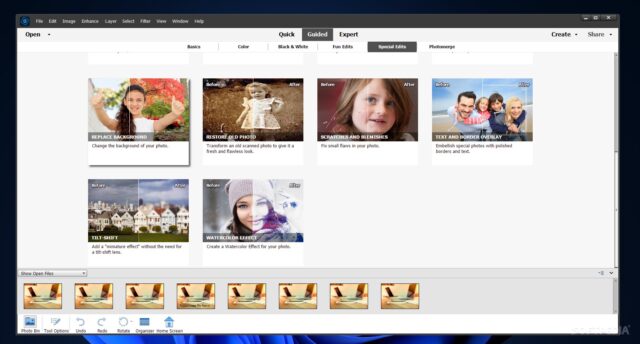
The software comes with two main workspaces: the Organizer and the Editor. The Organizer helps you import, tag, rate, and catalog your photos. The Editor is where the actual adjustments happen. Inside the Editor, you get three modes: Quick, Guided, and Expert. Quick mode handles basic adjustments like exposure, color, and sharpness. Guided mode walks you through specific effects step by step. Expert mode gives you access to layers, blend modes, masks, and the full tool palette, which is where most serious editing work happens.
Features of Adobe Photoshop Elements
AI-Powered Subject Selection
Photoshop Elements 2024 includes an AI-based selection tool that identifies and isolates subjects in your photos automatically. You click once on a person, pet, or object, and the software draws a selection around it with accurate edge detection. For portrait work, this is a practical time-saver. Cutting a person out of a background for a composite image used to take several minutes with manual selection tools. With the AI selection, you get a usable result in seconds, and you can refine the edges afterward if needed.
Guided Edits
The Guided Edit mode contains over 50 step-by-step tutorials built directly into the interface. You are not watching a video on a separate screen. The software walks you through each step inside the editing panel while your photo is open. Effects like double exposure, moving elements, and painterly overlays are all available as guided workflows. This mode works well for users who want to produce creative results without understanding the full technical process behind each step. You follow the instructions, apply the effect, and save the result.
Layer-Based Editing in Expert Mode
Expert mode gives you access to a full layers panel, adjustment layers, layer masks, and blend modes. This is where Photoshop Elements separates itself from basic photo editors. If you want to combine two photos, add a sky replacement, or create a composite with text and graphics, layers let you work non-destructively. You can stack 10 layers in a portrait edit, toggle each one on and off, and make targeted adjustments without affecting the original image. Anyone who has used Adobe Photoshop CC will recognize the workflow immediately.
Photo Organizer with Smart Albums
The built-in Organizer automatically sorts your photos by date, location, and recognized faces. You can create smart albums that populate automatically based on tags, star ratings, or date ranges. For someone managing thousands of vacation photos or a year’s worth of family images, the Organizer saves real time. You tag a set of photos from a trip to Japan once, and every image from that trip appears together in a smart album going forward. The face recognition feature identifies recurring people across your catalog and groups them, which makes finding photos of specific family members quick.
Sky Replacement
Sky replacement in Photoshop Elements works well enough for most outdoor photos. You select from a library of sky images included in the software, and the tool replaces the existing sky while adjusting the ground layer’s color temperature to match. The result is not always perfect on photos with complex horizon lines like tree branches or detailed architecture, but on clean landscape shots and urban exteriors with clear sky-to-ground edges, the replacement looks convincing. You can also import your own sky photos if the built-in library does not have what you need.
Text and Graphics Templates
Photoshop Elements includes a library of customizable templates for cards, social media graphics, photo books, and calendars. You choose a template, drag your photos into the placeholders, adjust the text, and export the result. For users who create printed products or social content regularly, this removes the layout work entirely. A birthday card that would take 30 minutes to design from scratch in a blank document takes about 5 minutes with a template. The quality of the templates varies, but the more recent additions in the 2024 version are cleaner and more modern than earlier versions.
Real-World Experience Using Photoshop Elements
Using Photoshop Elements day to day feels different depending on which mode you are working in. In Quick mode, the experience is fast. You open a photo, drag sliders for exposure and color, apply a smart filter, and export. This takes under two minutes for a standard edit. In Expert mode, the pace slows down, but that is the point. You are doing more precise work with layers and masks, and the additional time is productive.
The AI tools in the 2024 version are the most noticeable improvement over previous releases. Subject selection works accurately on most photos with clear subjects. Colorization for black and white photos produces results that look realistic on skin tones, though outdoor landscapes with complex color gradients require manual correction afterward. Overall, the AI features reduce repetitive manual work rather than replacing your judgment entirely, which is the right balance for a photo editor.
Performance on a mid-range laptop with 16 GB of RAM and a dedicated GPU is smooth for standard JPEG and RAW files. Large layered files with 20 or more layers slow the application slightly on older hardware, but the experience remains workable. If your machine is five or more years old and has only integrated graphics, you may notice lag when working with complex composites.
Conclusion
Photoshop Elements is a capable photo editor that covers the needs of most non-professional photographers honestly and without overcomplicating the process. The one-time purchase model makes it a financially straightforward choice compared to subscription-based alternatives. The Expert mode gives you enough depth to do serious work, and the Guided and Quick modes handle everyday editing efficiently. It is not a replacement for Photoshop CC if you need full professional control, but for photographers who want strong editing tools, an organized catalog, and AI-assisted features without a recurring cost, Photoshop Elements delivers on what it promises.
Adobe Photoshop Elements System Requirements
| Component | Minimum Requirement | Recommended Requirement |
|---|---|---|
| Operating System | Windows 10 (64-bit, version 21H2) or macOS 11 Big Sur | Windows 11 (64-bit) or macOS 13 Ventura |
| Processor (CPU) | 2 GHz or faster 64-bit processor | 3 GHz Intel Core i7 or AMD Ryzen 7 multi-core processor |
| RAM | 8 GB | 16 GB or more |
| Storage | 6.5 GB free disk space for installation | SSD with 20 GB or more free space |
| Graphics | DirectX 12 compatible GPU with 1 GB VRAM | Dedicated GPU with 4 GB VRAM or more (NVIDIA or AMD) |
| Display Resolution | 1024 x 768 | 1920 x 1080 or higher |
| Internet | Required for activation and installer download | Required for updates, online sharing, and cloud-connected features |