
If you design mechanical parts, assemblies, or industrial products for a living, Autodesk Inventor Professional is software you have likely already heard of. It is a professional-grade 3D CAD tool built for mechanical engineers, product designers, and manufacturing teams. Unlike general-purpose design software, Inventor was built specifically for engineering workflows. That means parametric modeling, stress analysis, dynamic simulation, and machine design tools are all built directly into the application. You do not need to switch between three different programs to complete an engineering project. Everything lives in one environment. This article covers what Inventor Professional actually does, which features matter most in a real production workflow, and what your workstation needs to run it without problems.
What Is Autodesk Inventor Professional?
Autodesk Inventor Professional is a 3D mechanical CAD application developed by Autodesk. It has been on the market since 1999 and has grown into one of the most widely used mechanical design tools in manufacturing industries worldwide. The Professional version includes everything in the standard Inventor package and adds advanced tools for dynamic simulation, stress analysis with finite element analysis (FEA), routed systems design for tubes and cables, and mold design. Engineers working in automotive, industrial machinery, consumer products, and aerospace use it regularly for full product development cycles, from initial concept modeling through to production-ready drawings and bill of materials output.
Core Features of Autodesk Inventor Professional
Parametric 3D Modeling
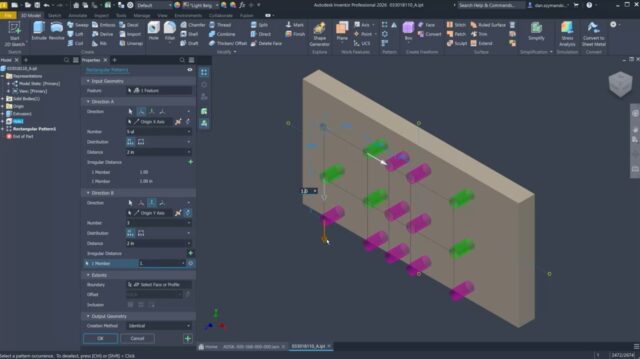
Inventor’s parametric modeling engine lets you build parts by defining dimensions, constraints, and relationships between geometry. When you change one dimension, every dependent feature updates automatically. For example, if you design a bracket with a hole pattern tied to a flange width, and you later change the flange width from 80mm to 100mm, the hole spacing updates without manual intervention. This is the foundation of professional mechanical CAD, and Inventor handles it with a clean, history-based feature tree that lets you go back and modify any earlier step without breaking the model.
Assembly Design and Constraints
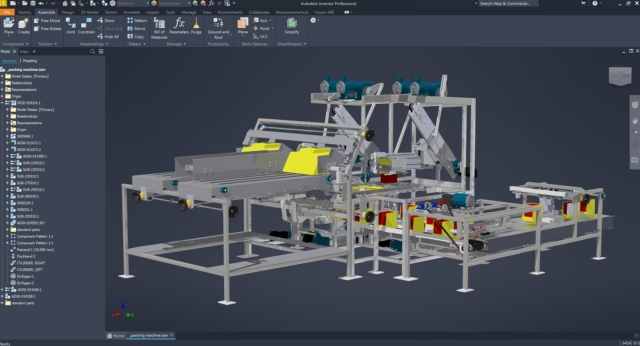
Inventor handles large assemblies well. You can build assemblies from individual part files, apply constraints to define how parts relate to each other, and then check for interference between components. A mechanical assembly with 500 or more components is something Inventor manages regularly in production environments. You can also use adaptive parts, where a component adjusts its geometry based on context within the assembly. This is particularly useful for components like gaskets, brackets, or fittings that must match the geometry of surrounding parts exactly.
Finite Element Analysis (FEA) and Stress Simulation
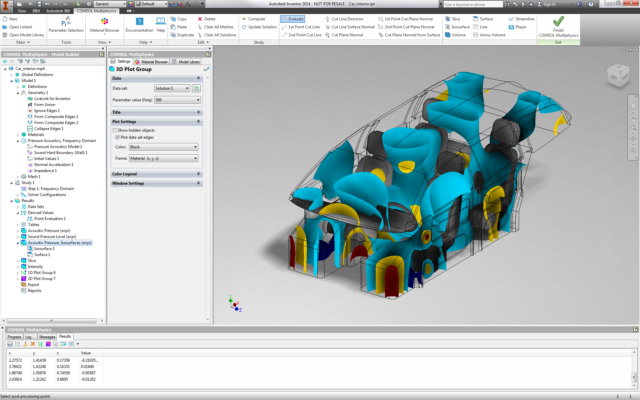
The Professional version includes Inventor Nastran for FEA. You apply loads and constraints directly to your 3D model, mesh it, and run the analysis to see where stress concentrations occur and whether a part will hold under operational conditions. An engineer designing a load-bearing bracket for a conveyor system, for instance, can apply a 2,000 N downward force, run the analysis, and identify whether the wall thickness needs to increase before sending the design to fabrication. Running this check inside Inventor saves the time it would take to export geometry to a separate FEA tool and reassemble the setup.
Dynamic Simulation
Dynamic simulation in Inventor Professional lets you test how a mechanism moves under real forces and motion inputs. You define joints between components, assign motors, springs, and forces, and then run a time-based simulation to see how the system behaves. If you are designing a hinged door with a pneumatic closer, you can model the closing force, simulate the full motion, and extract data like hinge reaction forces and angular velocity over time. That data feeds back into your stress analysis, giving you load cases based on actual simulated behavior rather than estimated values.
Tube, Pipe, and Cable Design
Inventor Professional includes routed systems tools for designing tube runs, pipe networks, electrical harnesses, and cable assemblies directly inside the 3D model. You define routing paths, select standard pipe or tube specifications from a library, and the software places and connects the runs while managing fittings automatically. The output includes a complete bill of materials with part numbers, lengths, and bend data, which feeds directly to fabrication. This feature is essential for industrial machine design, where routing decisions affect both function and manufacturing cost.
Drawing and Documentation Output
Inventor’s drawing environment pulls geometry directly from your 3D model. You place views, add dimensions, and annotate the drawing without manually redrawing anything. If the model changes, the drawing updates. For a manufacturing team working to tight tolerances, Inventor supports GD&T annotations, thread callouts, surface finish symbols, and custom title block templates. You can output drawings as DWG files for use in AutoCAD, or as PDF files for distribution. The bill of materials pulls directly from the assembly, reducing the risk of errors that come from manually maintaining a separate spreadsheet.
Real-World Experience Using Inventor Professional
Using Inventor in a real production environment reveals where it performs well and where you need to adjust your expectations. Large assemblies with over 1,000 components can slow the software down noticeably, especially on a workstation with less than 32 GB of RAM. Autodesk provides a feature called Level of Detail, which lets you suppress components not relevant to the current task, and using it consistently makes a measurable difference in response time.
The FEA tools are functional for standard engineering checks, but they are not a replacement for dedicated FEA software on highly complex structural problems. For day-to-day engineering validation on standard machined and fabricated parts, they are more than adequate. The integration between the simulation environment and the part model is straightforward, and results are clear enough to act on without extensive post-processing knowledge.
Inventor’s interoperability with other Autodesk products is a practical advantage in mixed-software environments. If your team uses AutoCAD for 2D plant layouts and Inventor for machine design, the data exchange works cleanly. Importing STEP and IGES files from non-Autodesk sources generally works without major issues, though complex surface geometry from NURBS-heavy files sometimes requires cleanup before it is fully editable.
Conclusion
Autodesk Inventor Professional is a capable, mature mechanical CAD tool that handles the full range of tasks in a product development workflow. The parametric modeling engine is solid, the simulation tools add real engineering value when used correctly, and the drawing output is production-ready. It is not the cheapest option available, and it does require capable hardware to run comfortably at scale. However, for engineering teams working on mechanical products that require simulation, routed systems design, and detailed manufacturing documentation, Inventor Professional covers all of that in a single application. If your work involves designing physical products that go into production, this is a tool worth evaluating seriously.
Autodesk Inventor Professional System Requirements
| Component | Minimum Requirement | Recommended Requirement |
|---|---|---|
| Operating System | Windows 10 (64-bit, version 21H2 or later) | Windows 11 (64-bit) |
| Processor (CPU) | 2.5 GHz or faster 64-bit processor | 3.0 GHz or faster Intel Core i7 or AMD Ryzen 7 (multi-core) |
| RAM | 16 GB | 32 GB or more |
| Storage | 40 GB free disk space | SSD with 100+ GB free space |
| Graphics | 1 GB GPU with DirectX 11 support | 4 GB GPU or higher (NVIDIA Quadro or AMD Radeon Pro recommended) |
| Display Resolution | 1280 x 1024 | 1920 x 1080 or higher |
| Internet | Required for license activation and updates | Required for cloud collaboration, Autodesk Drive, and software updates |