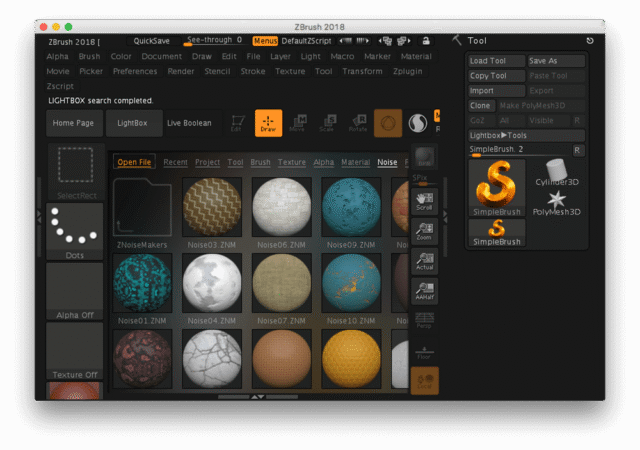
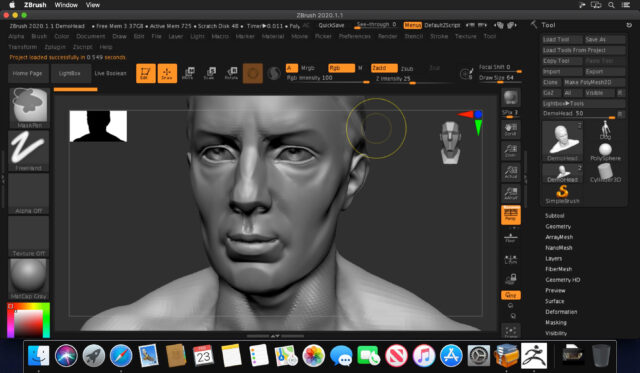
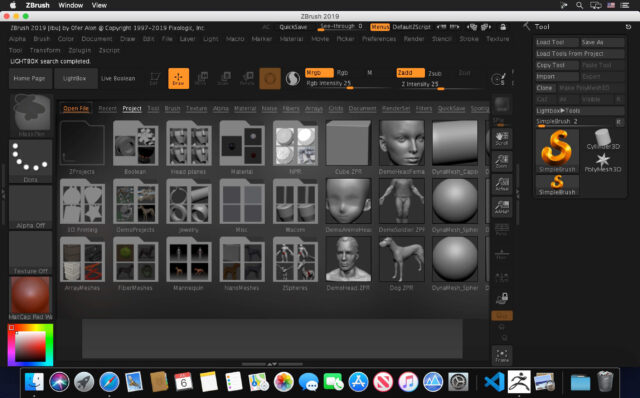
If you work in 3D character design, game development, or film production, you have likely heard the name ZBrush. Pixologic built it specifically for digital sculpting, and it has held a dominant position in the industry for over two decades. Today it sits under Maxon, but the core experience remains the same. You open the software, pick up a brush, and start sculpting a 3D model with the same kind of control you would have shaping real clay. No other tool on the market handles high-polygon sculpting with the same level of responsiveness. Character artists at studios like Naughty Dog, ILM, and Weta Workshop have used ZBrush to build creatures, props, and environments for major productions. If you are serious about 3D art, this is the tool the industry works with.
What Is Pixologic ZBrush?
Pixologic ZBrush is a professional digital sculpting and painting application designed for creating highly detailed 3D models. Pixologic originally released it in 1999, and Maxon acquired the company in 2021. The software is now distributed through the Maxon App and available as a subscription. As of 2024, ZBrush costs $39 per month or $359 per year. A 14-day free trial is available through the Maxon website, which gives you full access to test the software before committing to a plan. ZBrush runs on Windows, macOS, and iPadOS, which puts it ahead of several competitors that still lock you to a single platform. The software is used across film, game development, concept art, 3D printing, jewelry design, and scientific visualization. Its brush-based sculpting system is the foundation everything else is built on.
Core Features of Pixologic ZBrush
Brush-Based Sculpting System
ZBrush gives you access to over 400 customizable sculpting brushes. Every brush responds to pen pressure, tilt, and speed, which means the harder you press, the deeper the stroke. You can build surface detail, carve wrinkles, push geometry, pull shapes, and smooth surfaces all within the same workspace. Sculptris Pro mode takes this further by dynamically adding polygons exactly where you need them, so you can work on fine details without worrying about the base mesh structure underneath. For a character artist sculpting a face, this means you can rough out the overall head shape and then push directly into pore-level skin detail without stopping to retopologize or subdivide manually.
ZRemesher
ZRemesher is one of the most practical tools in ZBrush for anyone who needs to take a sculpt into production. After you build a high-resolution model, ZRemesher automatically rebuilds the surface topology into clean, evenly distributed polygons with a single button press. You control the target polygon count and guide curves to influence edge flow in specific areas like the mouth, eyes, and ears. For game artists, this saves hours of manual retopology work. You sculpt freely, then run ZRemesher to get a game-ready low-poly mesh that preserves the shape of your high-resolution model. It is not always perfect on its own, but it gets you 80 to 90 percent of the way there faster than any manual method.
PolyPaint and Texture Painting
ZBrush lets you paint directly onto the surface of your 3D model without any UV mapping preparation. This feature is called PolyPaint. You apply color, texture, and detail straight onto the mesh using the same brushes you sculpt with. When you are ready to export textures for another application like Substance Painter or Unreal Engine, ZBrush bakes the PolyPaint data into standard UV-based texture maps. This workflow speeds up the early stages of character design because you can test color schemes and material ideas without setting up a full texturing pipeline first. ZBrush 2025 also added a Substance Bridge that lets you move your sculpt directly into Substance Painter in one click.
GoZ Integration
GoZ is ZBrush’s built-in bridge to other 3D applications. You send your model from ZBrush directly to Maya, 3ds Max, Cinema 4D, or Blender and the topology, textures, and materials carry over with it. When you make changes in the receiving application and send the model back, ZBrush picks up where it left off. The 2025 update improved GoZ compatibility with Maya 2026 and 3ds Max 2026, which matters for studios running current software versions. For a pipeline that involves multiple artists and multiple tools, GoZ removes the manual export-import process and reduces the chance of version mismatches or data loss between applications.
Repeat to Similar Feature
Introduced in ZBrush 2024, Repeat to Similar is a tool that saves significant time when you are working with characters or assets that have repeated geometry. You make a sculpting change, masking adjustment, PolyGroup modification, or PolyPaint update to one mesh, and ZBrush automatically applies that same change to every other mesh with similar topology in your scene. For a creature artist building a symmetrical character with repeated armor panels or a game developer managing multiple variants of the same asset, this removes the tedious process of manually repeating the same edit across dozens of sub-tools.
BPR Rendering
ZBrush includes a built-in rendering system called Best Preview Render, or BPR. It is not a full production renderer, but it produces clean, high-quality images of your sculpts without sending the model to an external application. You get control over ambient occlusion, subsurface scattering, wax simulation, shadows, and depth of field. For a portfolio piece or a client review image, BPR gives you results fast. A character sculpt with skin pores, surface noise, and cavity shading can render in under two minutes on a mid-range workstation. You do not need Redshift, V-Ray, or any third-party renderer to show your work in a professional light.
Real-World Experience with ZBrush
Spending time with ZBrush makes one thing clear: the learning curve is real and steep. The interface does not follow the conventions of most other 3D software, and that catches new users off guard. Basic navigation, brush selection, and layer management work differently here than in Blender or Maya. Most artists spend two to four weeks just getting comfortable with the workspace before any productive work happens. That said, once the basics click, the software rewards the investment. You can hold 20 to 30 million polygons in a single model and continue sculpting without significant slowdown on a machine with 32GB of RAM and a modern CPU. The pen tablet experience on a Wacom Pro Pen 2 is accurate enough that long sculpting sessions feel natural rather than mechanical. ZBrush on iPad also works well for sketch sessions and early concepting, though the desktop version still handles heavy production work better.
Conclusion
ZBrush is the right tool if your work involves detailed 3D sculpting at a professional level. It is not the easiest software to learn, and the subscription model is a real cost for freelancers working with limited budgets. The interface takes time to internalize, and new users will feel lost in the early weeks. But if you work in games, film, or character design, the industry uses ZBrush. Your clients expect assets built with it. Your collaborators work with it. Learning it is not optional if you want to operate at the same level as working professionals. The 14-day trial through Maxon gives you enough time to test your hardware and get a feel for the sculpting workflow before spending money on a subscription.
Pixologic ZBrush System Requirements
| Component | Minimum Requirement | Recommended Requirement |
|---|---|---|
| Operating System | Windows 10 (64-bit) or macOS 11.5 | Windows 11 (64-bit) or macOS 13 and above |
| Processor (CPU) | Core2Duo or AMD equivalent with SSE2 support | Intel Core i7/i9 or AMD Ryzen 7/9 (multi-core, 3+ GHz) |
| RAM | 8 GB | 32 GB or more for multi-million polygon models |
| Storage | 100 GB free hard drive space | SSD with 100+ GB free space for scratch disk performance |
| Graphics | Any GPU supporting OpenGL 3.3 and Vulkan 1.1 (manufactured 2008 or newer) | NVIDIA RTX 3070 or AMD RX 6700 XT with 8+ GB VRAM |
| Display Resolution | 1920 x 1080 with 32-bit color | 2560 x 1440 or higher |
| Internet | Required for license activation via Maxon App | Required for cloud features, updates, and GoZ integration |