
What Is Wise Care 365 Pro?
Wise Care 365 Pro is developed by WiseCleaner, a software company that has been building Windows utility tools for over a decade. The product began as a combination of two earlier tools, Wise Registry Cleaner and Wise Disk Cleaner, and grew into a full PC maintenance suite. The Pro version adds automatic scheduled cleaning, real-time system protection, deeper privacy tools, and priority customer support on top of what the free edition offers.
The interface is organized into five main sections: PC Checkup, System Cleaner, System Tuneup, Privacy Protector, and System Monitor. Each section targets a specific maintenance task. You can run everything through the PC Checkup tab in one click, or open individual sections and control exactly what gets cleaned or changed. That flexibility matters if you prefer to review results before applying them rather than letting the software make changes automatically.
The software runs on Windows XP through Windows 11, supports both 32-bit and 64-bit systems, and is compatible with 4K UHD displays. The installer is under 30 MB. For a tool with this many functions, it is a genuinely light installation that does not demand much from your system to run.
Core Features of Wise Care 365 Pro
PC Checkup
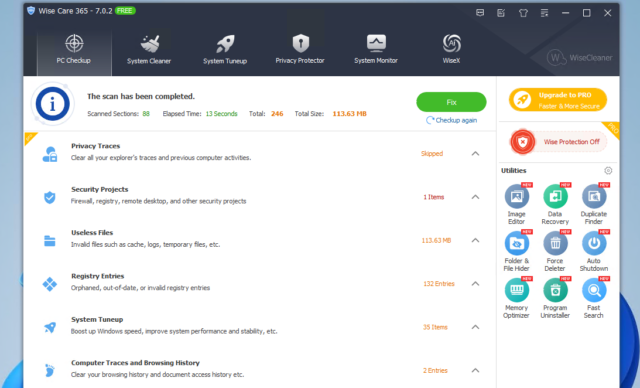
PC Checkup is the one-click scan that covers the most common performance problems at once. When you click the Checkup button, the software scans for junk files, invalid registry entries, privacy traces, security issues, browser history, and startup items that do not need to run. The scan takes around 60 to 90 seconds on a typical machine. After it finishes, you get a breakdown of what it found, how many registry errors exist, how much disk space junk files are occupying, and which privacy traces it detected. A user who ran PC Checkup on a 3-year-old Windows 10 laptop found 8 GB of junk files and 445 unnecessary registry keys in a single scan. You choose what to fix and click Optimize. That is the entire process for a standard maintenance session.
System Cleaner
The System Cleaner section handles disk cleaning and registry cleaning separately, with more detail than the one-click checkup provides. The disk cleaner removes temporary files, browser cache from Chrome, Firefox, Edge, Opera, and Safari, download history, broken shortcuts, recent file traces, and Windows Delivery Optimization files. The registry cleaner finds invalid entries, leftover references to software you already removed, and corrupt registry paths that can cause application errors. It also includes a Large Files Manager that scans your drives and lists files over a size you define, which is useful when you want to find space-consuming files you may have forgotten about. After every registry cleaning session, Wise Care 365 Pro creates a backup automatically. If anything goes wrong, you restore the previous state from within the software.
System Tuneup
System Tuneup focuses on performance rather than cleaning. It includes startup manager, disk defragmenter, registry defragmenter, system optimizer, and a service manager. The startup manager lists every program that launches when Windows starts and lets you disable the ones you do not need. On a machine with 14 startup programs, disabling 8 unnecessary ones can cut boot time from 45 seconds to under 20 seconds. Disk defragmentation reorganizes fragmented data on traditional hard drives so files load faster. Registry defragmentation compresses and reorganizes the Windows registry to reduce its size and improve read speed. These are not instant fixes, but they produce measurable improvements on machines that have not been maintained in months.
Privacy Protector
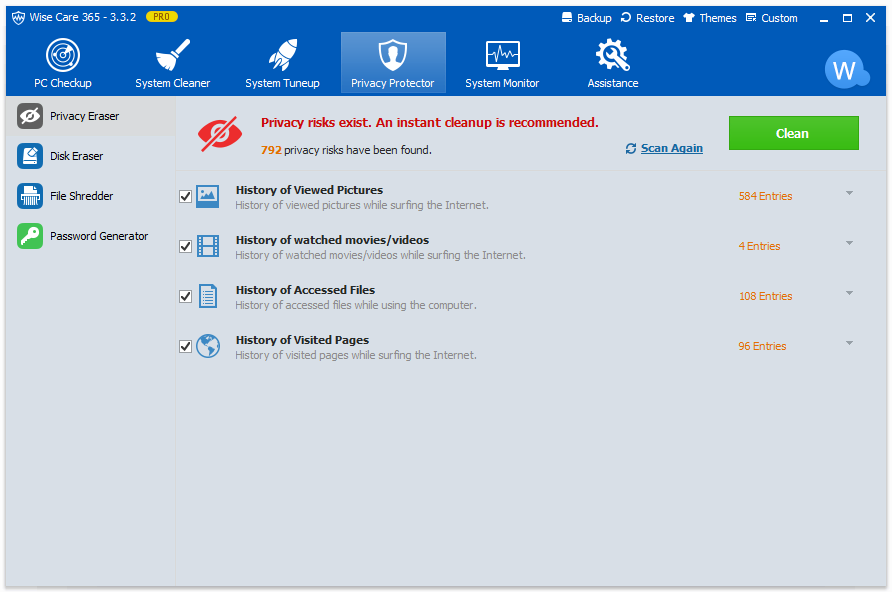
Privacy Protector removes traces of your computer activity that standard deletion leaves behind. It erases browsing history, recently opened files, viewed image and video history, and accessed document paths. Beyond erasing history, it includes a File Shredder that overwrites deleted files so recovery tools cannot retrieve them, a Disk Eraser that wipes entire drives or free space, and a Password Generator for creating secure account passwords. For anyone who shares a computer at home or uses a work machine that others can access, these tools are practical. The File Shredder is especially useful when disposing of a hard drive. Simply deleting files before selling or discarding a drive does not prevent recovery. Wise Care 365 Pro’s shredder overwrites the data so it cannot be reconstructed.
Real-Time System Protection
This is a Pro-only feature that the free version does not include. Real-Time System Protection monitors your system for unwanted changes and blocks them before they take effect. It prevents programs from modifying your browser homepage, changing your default browser, adding items to Windows startup without permission, and inserting entries into the Windows context menu. Many software installers quietly make these changes during installation without asking. With Real-Time Protection active, those changes get blocked and you receive a notification instead. For users who install software regularly, this feature alone saves time you would otherwise spend cleaning up unwanted browser toolbars, hijacked homepages, and startup bloat.
System Monitor
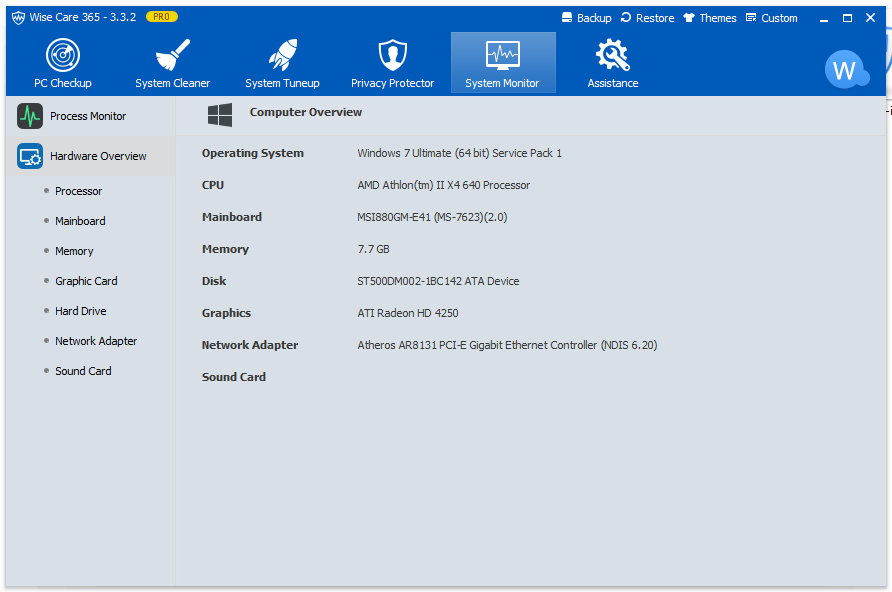
System Monitor gives you a live view of what is happening on your machine. It shows CPU usage, RAM consumption, disk activity, and temperature readings in real time. A compact floating window sits in the corner of your screen so you can keep an eye on resource usage while working without opening the full application. The hardware overview tab lists detailed information about your CPU, motherboard, memory modules, graphics card, storage devices, network adapters, and sound cards. If you notice a program consuming excessive CPU without a clear reason, System Monitor helps you identify and end it from within the interface without opening Task Manager separately.
Real-World Experience with Wise Care 365 Pro
In practice, Wise Care 365 Pro works best as a scheduled maintenance tool rather than an emergency fix. If you run PC Checkup once a week, your registry stays clean, junk files do not accumulate past a few hundred MB, and startup times stay predictable. Users running Windows 11 on mid-range hardware consistently report that boot times drop noticeably after the first full optimization. One long-term user noted that after installing it on Windows 10 and keeping it active, they never had to reinstall the operating system, and performance stayed stable for years. After upgrading to Windows 11, the same user said it resolved a system problem they were experiencing within a single optimization session.
The scanning speed is genuinely fast. Multiple users who compared it to CCleaner and Advanced SystemCare noted that Wise Care 365 Pro’s initial scan completes in roughly half the time. The results are also more detailed. Where some cleaners give you a single number for junk found, Wise Care 365 Pro breaks down exactly what category each file belongs to, letting you make informed decisions about what to remove.
The software does prompt you to close browsers before running a deep clean so it can access browser cache files. This is expected behavior and not a flaw. If you leave browsers open, some cached files remain locked and the cleaner skips them. Closing them before a scan gives you the most complete result.
Limitations to Know Before You Buy
Wise Care 365 Pro only runs on Windows. There is no macOS version and no Linux support. If you use an Apple machine as your primary computer, this tool is not available to you.
The free version covers the basics well enough for light users. The Pro version’s main advantages over the free edition are scheduled automatic cleaning, real-time protection, deeper privacy tools, and priority support. If you run manual scans occasionally and do not need background protection, the free version may be sufficient for your needs.
Like all registry cleaners, Wise Care 365 Pro is not a cure for deep hardware problems. If your machine is slow because of failing RAM or an aging hard drive, software optimization will not fix that. The tool is built for software-layer maintenance, not hardware diagnostics. It does what it says within that scope, and it does it reliably.
Conclusion
Wise Care 365 Pro is a well-built, honest PC maintenance tool. It covers registry cleaning, disk cleaning, privacy protection, system tuning, and real-time monitoring without requiring you to manage five separate programs. The interface is clean, the scans run fast, and the results are clear enough for both first-time users and people who want granular control over what gets cleaned. The automatic backup before every registry change shows that the developers take stability seriously. If you use a Windows machine regularly and want one tool to keep it running well over time, Wise Care 365 Pro is a practical, low-friction choice that delivers consistent results.
Wise Care 365 Pro System Requirements
| Component | Minimum Requirement | Recommended Requirement |
|---|---|---|
| Operating System | Windows XP (32-bit or 64-bit) | Windows 10 or Windows 11 (64-bit) |
| Processor (CPU) | Pentium 1 GHz or above | Intel Core i5 or AMD Ryzen 5 at 2.5 GHz or above |
| RAM | 4 GB | 8 GB or more |
| Storage | 70 MB free disk space for installation | SSD with 500 MB free space for installation and logs |
| Graphics | Any GPU with basic DirectX support | Any GPU supporting 4K UHD display scaling |
| Display Resolution | 1024 x 768 | 1920 x 1080 or higher (4K UHD supported) |
| Internet | Required for license activation and updates | Broadband connection for cloud features and automatic updates |